Сообщения

5/10/16 W

1) Xcode can run without build - Ctrl+Cmd+R 2) You can try pod example without cloning repo: pod try Google

Fr 05/09/16

1) How to start application in Xcode for different languages while testing.      In order to change default order of languages only for your XCode project, you can go to the Product > Scheme > Edit scheme, and add argument to "Run" scheme, for example: -AppleLanguages "(English,Russian)". 2) Go through all strings and take them to localizable.strings Type “cd ”, then drag in your project folder, then press enter to navigate to your project: find ./ -name "*.m" -print0 | xargs -0 genstrings -o en.lproj 3)  Git steps to create pull request Fork it! Create your feature branch:  git checkout -b my-new-feature Commit your changes:  git commit -am 'Add some feature' Push to the branch:  git push origin my-new-feature Submit a pull request :D
Mon 01/08/16

1) Disadvantage in using delegate of UITextField due to changing values in Cell's text fields.       If you have UITableView with UITextField in it's cells, you need to update it. There are some ways, and one of them to use UITextFieldDelegate like in example: func textField(textField: UITextField, shouldChangeCharactersInRange range: NSRange, replacementString string: String) -> Bool { if string == " " { return false } let indexPathForCellWhereTextFieldIs = self.tableView.indexPathForCell(textField.superview?.superview as! UITableViewCell) if indexPathForCellWhereTextFieldIs != nil { textFieldValues[(indexPathForCellWhereTextFieldIs?.section)!] = (textField.text! as NSString).stringByReplacingCharactersInRange(range, withString: string) as NSString as String } return true } So you have to check if  indexPathForCellWhereTextFieldIs  is'n nil.

Wen 27/07/16

1) In viewWill/DidDisappear methods place code before [super ...].       - (void)viewWillDisappear:(BOOL)animated {     if ([self.navigationController.viewControllers indexOfObject:self] == NSNotFound)          {             [self.view.window endEditing:YES];              self.navigationController.toolbarHidden = YES;           }      [super viewWillDisappear:animated];  }

Tue 26/07/16

Изображение
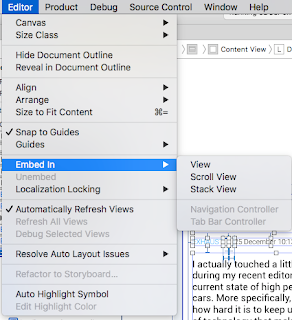
1) How to select the row for default in UITableView.       First way in ViewDidLoad: //select first cell for default self.clearsSelectionOnViewWillAppear = NO; //if you use UITableViewController (delete if you use UIViewController NSIndexPath *indexPath = [NSIndexPath indexPathForRow:2 inSection:0]; [self.tableView selectRowAtIndexPath:indexPath animated:NO scrollPosition:UITableViewScrollPositionNone];     Second modern way: tableView . remembersLastFocusedIndexPath = Yes ; - ( NSIndexPath *) indexPathForPreferredFocusedViewInTableView :( UITableView *) tableView From here . 2) How to use scrollView without ContentView     First of all select elements in .xib that you want to place at scrollView. Embed it in ScrollView from menu like at screen. Constrain ScrollView to UIView bounds. Constrain elements in ScrollView like you do it in regular UIView. (Maybe you have to use "Freeform" setting in Utiliti...

Mon 07/26/16

1) How to change section header's titleLabel attributes.       From iOS 7.0 instead of using viewForHeaderInIndexPath... you can use - (void)tableView:(UITableView *)tableView willDisplayHeaderView:(UIView *)view forSection:(NSInteger)section {     UITableViewHeaderFooterView *header = (UITableViewHeaderFooterView *)view;     header.textLabel.font = [UIFont fontWithName:@"Roboto" size:20];     header.textLabel.textAlignment = NSTextAlignmentCenter; }

Fr 07/22/16

1) How to convert NSInteger to String in modern Objective-C.       You can forget about  NSString *inStr = [NSString stringWithFormat: @"%ld", (long)month]; Use this: NSInteger value = x ; NSString * string = [@( value ) stringValue ]; Here @( value ) converts the given NSIntegert to NSNumber object from which you get the desired type . 2) How to  amazingly close keyboard without any code.      Here 3) Difference between search bar and search display controller.